Grade 5 Multiplication Drills - 13 Interactive Multiplication Drills
This section features a wide variety of multiplication drills - both online and printable. Students can practice long multiplication, multiplying fractions and decimals, word problems with multiplication, and much more. Use the filters on the left side of the page to isolate activities by grade level and/or by format (online or printable). Drills are listed in order of grade level, from lowest to highest.

Multiplication Flash Cards SIGMA
Description: The Customizable Multiplication Flash Cards activity transforms traditional math fact practice into an engaging, personalized learning experience. Students begin by answering a series of simple setup questions to create a practice session that matches their needs, including multiplication facts, timing options, card orientation, colors, and feedback preferences. The activity records response times, tracks accuracy, and generates a detailed printable performance report with mastery levels, making it an excellent tool for classroom practice, intervention, homeschool instruction, and progress monitoring. Accessible, flexible, and easy to use, it helps students build multiplication fluency while allowing teachers and parents to monitor growth over time.

Math Facts Diagnostic
Description: This simple yet customizable program allows students to test their addition, subtraction, multiplication, or division facts through problems or word problems. It also allows students to practice rounding, place value, and inequalities.

Multiplying Decimals by Powers of Ten - Online
Description: This activity requires students to multiply decimals by powers of ten. It gives immediate feedback.

Multiplying a Whole Number by a Decimal (to the tenth) - Online
Description: This activity requires students to multiply a whole number by a tenth. For example, 8 x 0.4. Immediate feedback is given.

Multiplying Decimals to the Tenths - Online
Description: This activity requires students to multiply decimals to the tenths. For example, 4.3 x 2.7. Immediate feedback is given.

Multiplying Decimals to the Hundredths - Online
Description: This activity requires students to multiply decimals to the hundredths. For example, 2.35 x 4.72. Immediate feedback is given.

Multiplying Decimals to the Tenths and Hundredths - Online
Description: This activity requires students to multiply decimals to the tenths and hundredths. For example, 7.56 x 3.3. Immediate feedback is given.

Multiplying Three-digit by Three-digit Word Problems - Online
Description: This activity requires students to solve word problems with triple-digit multiplication. It gives immediate feedback.

Converting Decimals to Fractions - Online
Description: This activity will help students practice identify the fraction equivalents of decimals.

Estimating Products - Online
Description: This activity requires students to estimate the answers to multi-digit multiplication problems.

Estimating Products of Difficult Multiplication Problems - Online
Description: This activity requires students to estimate products of multiplication problems such as 67 x 54. It gives immediate feedback.

Word Problems Using Multiplication (Products) Estimation - Online
Description: This activity requires students to solve word problems with product estimation
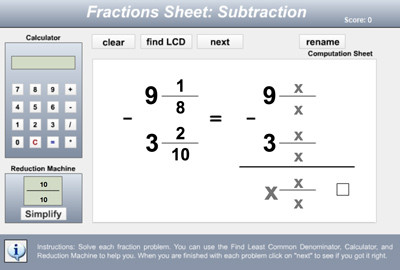
EZ Fractions - Adding, Subtracting, Multiplying, and Dividing Fractions
Description: EZ Fractions is a popular fractions workshop that allows students to perform operations with fractions in a simplified environment that assists them in renaming, reducing, cross-multiplying, or finding LCM and GCF. Customizable! This is similar to our Fraction Workshop, but some users like the format better.

Fraction Workshop - Online
Description: NEW AND IMPROVED! Fraction Workshop is an amazing application that allows students to complete any kind of fraction operation in an online stage with tools to help them. Fraction workshop allows users to practice ordering, reducing, adding, subtracting, multiplying, and dividing fractions and mixed numbers. Our drag and drop system makes ordering and organizing numbers easy. Choose the number of problems to practice, the specific skill to practice and click “begin”. Work the problem on the stage and drag and drop the correct numbers to the answer box. The system will indicate immediately whether or not your answer is correct. Printout a score summary when you are finished. Students can use the calculator tool or the visualize tool to help them work on the problems. The visualize tool turns the particular math problem into a picture. This helps students to better “see” the problem.

Fraction Workshop Demonstration Video
Description: This video will show you how to use Fraction Workshop
Advertisement